Download notebook · View source · Open in Colab
Building a RAG chain from a Website
Introduction
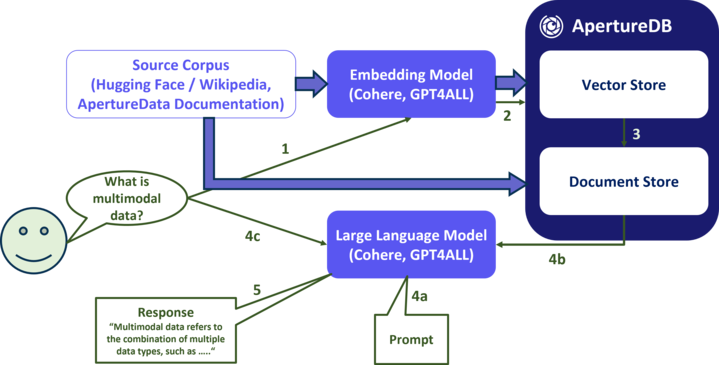
In this notebook, we will demonstrate how to use ApertureDB as part of a Retrieval-Augmented Generation Langchain pipeline. This means that we're going to use ApertureDB as a vector-based search engine to find documents that match the query and then use a large-language model to generate an answer based on those documents.
Specifically, we will:
- Create prompts for the LLM
- Create an embedding model
- Configure a connection to ApertureDB
- Set up ApertureDB as a LangChain vectorestore
- Convert the vectorstore into a document retriever
- Create an LLM
- Build LangChain chains for both RAG and non-RAG
- Run the chains with a question
- Review the answers
If you have already completed the notebook Ingesting a Website into ApertureDB, then your ApertureDB instance should already contain text from your chosen website. We'll use that to answer natural-language questions.
Setup and Installations
Data management with ApertureDB
ApertureDB is set up as a database (server) and can be accessed from clients anywhere as long as the server is accessible on the network to the client.
Sign up for an Aperture cloud account here (30 days free trial) or see other methods here
Connection method with ApertureDB
Installation instructions for the various packages needed for this application are as follows:
%pip install --quiet "aperturedb[langchain]>=1.0.1,<2" "langchain>=0.3,<0.4" langchain-core "langchain-community>=0.3,<0.4" langchainhub gpt4all
Choose a prompt
The prompt ties together the source documents and the user's query, and also sets some basic parameters for the chat engine. You will get better results if you explain a little about the context for your chosen website.
from langchain_core.prompts import PromptTemplate
prompt = PromptTemplate.from_template("""You are an assistant for question-answering tasks. Use the following documents to answer the question. If you don't know the answer, just say that you don't know. Use three sentences maximum and keep the answer concise.
Question: {question}
{context}
Answer:""")
print(prompt.template)
For comparison, we're also going to ask the same questions of the language model without using documents. This prompt is for a non-RAG chain.
from langchain_core.prompts import PromptTemplate
prompt2 = PromptTemplate.from_template("""You are an assistant for question-answering tasks. Answer the question from your general knowledge.  If you don't know the answer, just say that you don't know. Use three sentences maximum and keep the answer concise.
Question: {question}
Answer:""")
print(prompt2.template)
Choose an Embedding
We have to use the same embedding that we used when we loaded the documents. Here we're using the GPT4All package and loading one of its smaller models. Don't worry if you see messages about CUDA libraries being unavailable.
from langchain_community.embeddings import GPT4AllEmbeddings

embeddings = GPT4AllEmbeddings(model_name="all-MiniLM-L6-v2.gguf2.f16.gguf")
embeddings_dim = len(embeddings.embed_query("test"))
print(f"Embeddings dimension: {embeddings_dim}")
Connect to ApertureDB
For the next part, we need access to a specific ApertureDB instance. There are several ways to set this up. The code provided here will accept ApertureDB connection information as a JSON string. See our Configuration help page for more options.
! adb config create --from-json --active
Create vectorstore
Now we create a LangChain vectorstore object, backed by the ApertureDB instance we have already uploaded documents to. Remember to change the name of the DESCRIPTOR_CLASS if you changed it when you loaded the documents.
from aperturedb.LangChain import ApertureDB
import logging
import sys

DESCRIPTOR_CLASS = "test"

vectorstore = ApertureDB(embeddings=embeddings,
                 descriptor_class=DESCRIPTOR_CLASS)
Create a retriever
The retriever is responsible for finding the most relevant documents in the vectorstore for a given query. Here's we using the "max marginal relevance" retriever, which is a simple but effective way to find a diverse set of documents that are relevant to a query. For each query, we retrieve the top 10 documents, but we do so by fetching 20 and then selecting the top 5 using the MMR algorithm.
search_type = "mmr" # "similarity" or "mmr"
k = 4              # number of results used by LLM
fetch_k = 20       # number of results fetched for MMR
retriever = vectorstore.as_retriever(search_type=search_type,
    search_kwargs=dict(k=k, fetch_k=fetch_k))
Select an LLM engine
Here we're again using GPT4All, but there's no need to use the same provider as we used for embeddings. The model is around 4GB, so downloading it will take a little while.
from langchain_community.llms import GPT4All

llm = GPT4All(model="Meta-Llama-3-8B-Instruct.Q4_0.gguf", allow_download=True)
Build the chain
Now we put it all together. The chain is responsible for taking a user query and returning a response. It does this by first retrieving the most relevant documents using vector search, then using the LLM to generate a response.
For demonstration purposes, we're printing the documents that were retrieved, but in a real application you would probably want to hide this information from the user.
from langchain_core.runnables import RunnablePassthrough, RunnableParallel
from langchain_core.output_parsers import StrOutputParser

def format_docs(docs):
    return "\n\n".join(f"Document {i}: " + doc.page_content for i, doc in enumerate(docs, start=1))


rag_chain = (
    RunnablePassthrough.assign(context=(lambda x: format_docs(x["context"])))
    | prompt
    | llm
    | StrOutputParser()
)

rag_chain_with_source = RunnableParallel(
    {"context": retriever, "question": RunnablePassthrough()}
).assign(answer=rag_chain)
This chain does not use RAG.
plain_chain = (
  {"question": RunnablePassthrough()}
    | prompt2
    | llm
    | StrOutputParser()
)
Run the chain
Now we can enter a query and see the response. We're using a local LLM and we may not have GPU, so this is likely to be slow.
If you chose to crawl the ApertureDB documentation. here are some suggested questions:
- How do I upload many descriptors to ApertureData?
- How can I store audio files?
- What support is there for PyTorch?
- How can I use TensorBoard with ApertureDB?
- How can I get an individual frame from a video?
from IPython.display import display, Markdown
import re

def escape_markdown(text):
    text = re.sub(r'_*\[\]()~`>#+-=|{}.!', r'\\\1', text)
    text = re.sub(r'\n', r' ', text)
    return text


def run_query(user_query):
    display(Markdown(f"### User Query\n{user_query}"))

    nonrag_answer = plain_chain.invoke(user_query)
    display(Markdown(f"### Non-RAG Answer\n{nonrag_answer}"))

    rag_answer = rag_chain_with_source.invoke(user_query)

    display(Markdown("\n".join([
        f"### RAG Answer\n{rag_answer['answer']}",
        f"### Documents",
        *(f"{i}. **[{doc.metadata['title']}]({doc.metadata['url']})**: {escape_markdown(doc.page_content)}" for i, doc in enumerate(rag_answer["context"], 1))
    ])))


user_query = input("Enter a question:")
assert user_query, "Please enter a question."
run_query(user_query)